Reference
Documentation for the `ref` function.
A reference to a label or bibliography.
Takes a label and cross-references it. There are two kind of references, determined by its form: "normal" and "page".
The default, a "normal" reference, produces a textual reference to a label. For example, a reference to a heading will yield an appropriate string such as "Section 1" for a reference to the first heading. The word "Section" depends on the lang setting and is localized accordingly. The references are also links to the respective element. Reference syntax can also be used to cite from a bibliography.
As the default form requires a supplement and numbering, the label must be attached to a referenceable element. Referenceable elements include headings, figures, equations, and footnotes. To create a custom referenceable element like a theorem, you can create a figure of a custom kind and write a show rule for it. In the future, there might be a more direct way to define a custom referenceable element.
If you just want to link to a labelled element and not get an automatic textual reference, consider using the link function instead.
A "page" reference produces a page reference to a label, displaying the page number at its location. You can use the page's supplement to modify the text before the page number. Unlike a "normal" reference, the label can be attached to any element.
Example
#set page(numbering: "1")#set heading(numbering: "1.")#set math.equation(numbering: "(1)")= Introduction <intro>Recent developments intypesetting software haverekindled hope in previouslyfrustrated researchers. @distressAs shown in @results (see#ref(<results>, form: "page")),we ...= Results <results>We discuss our approach incomparison with others.== Performance <perf>@slow demonstrates what slowsoftware looks like.$ T(n) = O(2^n) $ <slow>#bibliography("works.bib")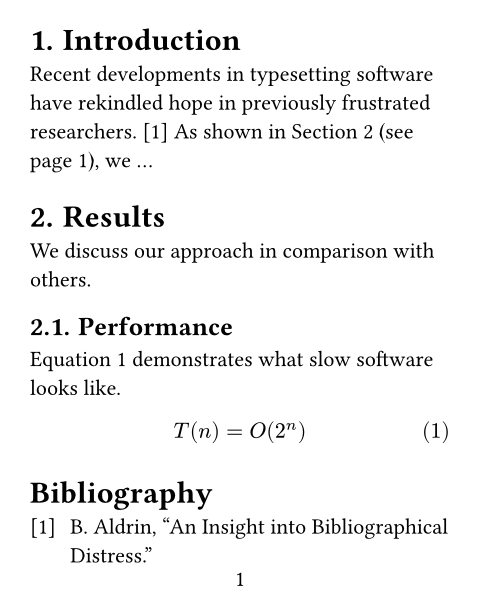
Syntax
This function also has dedicated syntax: A "normal" reference to a label can be created by typing an @ followed by the name of the label (e.g. = Introduction <intro> can be referenced by typing @intro).
To customize the supplement, add content in square brackets after the reference: @intro[Chapter].
Customization
When you only ever need to reference pages of a figure/table/heading/etc. in a document, the default form field value can be changed to "page" with a set rule. If you prefer a short "p." supplement over "page", the page.supplement field can be used for changing this:
If you write a show rule for references, you can access the referenced element through the element field of the reference. The element may be none even if it exists if Typst hasn't discovered it yet, so you always need to handle that case in your code.
#ref(
  target,
  supplement: none | auto | content | function,
  form: str
) -> content
Parameters
Prop
Type